A drilling technician is alone at a site three hours from the nearest town. A utilities crew member is working a fault line solo on a Sunday night shift. A community health worker is driving between properties with patchy reception. In each case, the same question sits underneath the operation: if something goes wrong, how long before anyone knows?
A lone worker check-in system is a scheduled communication workflow that prompts a worker in remote or isolated work to confirm they are safe, records each confirmation, and automatically escalates to a supervisor when a confirmation does not arrive. In Australia, this is not just good practice. It maps directly to a legal duty.
What the WHS framework actually asks for
Under the model Work Health and Safety framework adopted across most Australian jurisdictions, a person conducting a business or undertaking must manage the risks associated with remote or isolated work. The regulations are unusually specific on one point: managing that risk includes ensuring effective communication with the worker. Remote or isolated work is defined broadly. It covers work that is isolated from the assistance of other people because of the location, the time, or the nature of the work. A night-shift security guard in a Sydney warehouse can be a lone worker just as much as a station hand in the Pilbara.
The practical implication is that "we call them if we need them" does not describe a system of communication. A system has a schedule, a defined response, and a defined action when the response does not come. Regulators and investigators look for exactly that structure, and as we covered in our guide to auditable safety alert records under the WHS Act and HVNL, the difference between a process that exists and a process that produces records is where most of the exposure lives.
Where common approaches fall short
Most operators already do something. The problem is what that something produces.
Phone call rosters depend on a person remembering to make the call and another person remembering to log it. Weekend and overnight shifts are precisely when the roster breaks, and precisely when lone work risk peaks.
Group chats confirm that a message was sent to a group. They do not confirm that a specific worker at a specific site is safe at a specific time, and they produce nothing a safety manager can retrieve six months later without scrolling.
Email is where many operators start, because it already exists and costs nothing extra. For a welfare check it fails at both ends. The worker in a coverage-marginal area often cannot receive it in time, and an unanswered email triggers nothing, because email has no concept of a response window. A missed check simply sits unread in an inbox nobody is watching at 2 am, and there is no reliable record of whether the worker ever saw it.
Dedicated duress hardware solves for the emergency moment but not the routine welfare check, and it carries per-device costs that get hard to justify across a large seasonal or subcontracted workforce.
Smartphone safety apps assume every worker carries a charged smartphone with data coverage. Across Australian mining, agriculture, and utilities work, that assumption fails exactly where the risk is highest.
What a working check-in workflow looks like
The pattern that works is simple to describe and specific in its details.
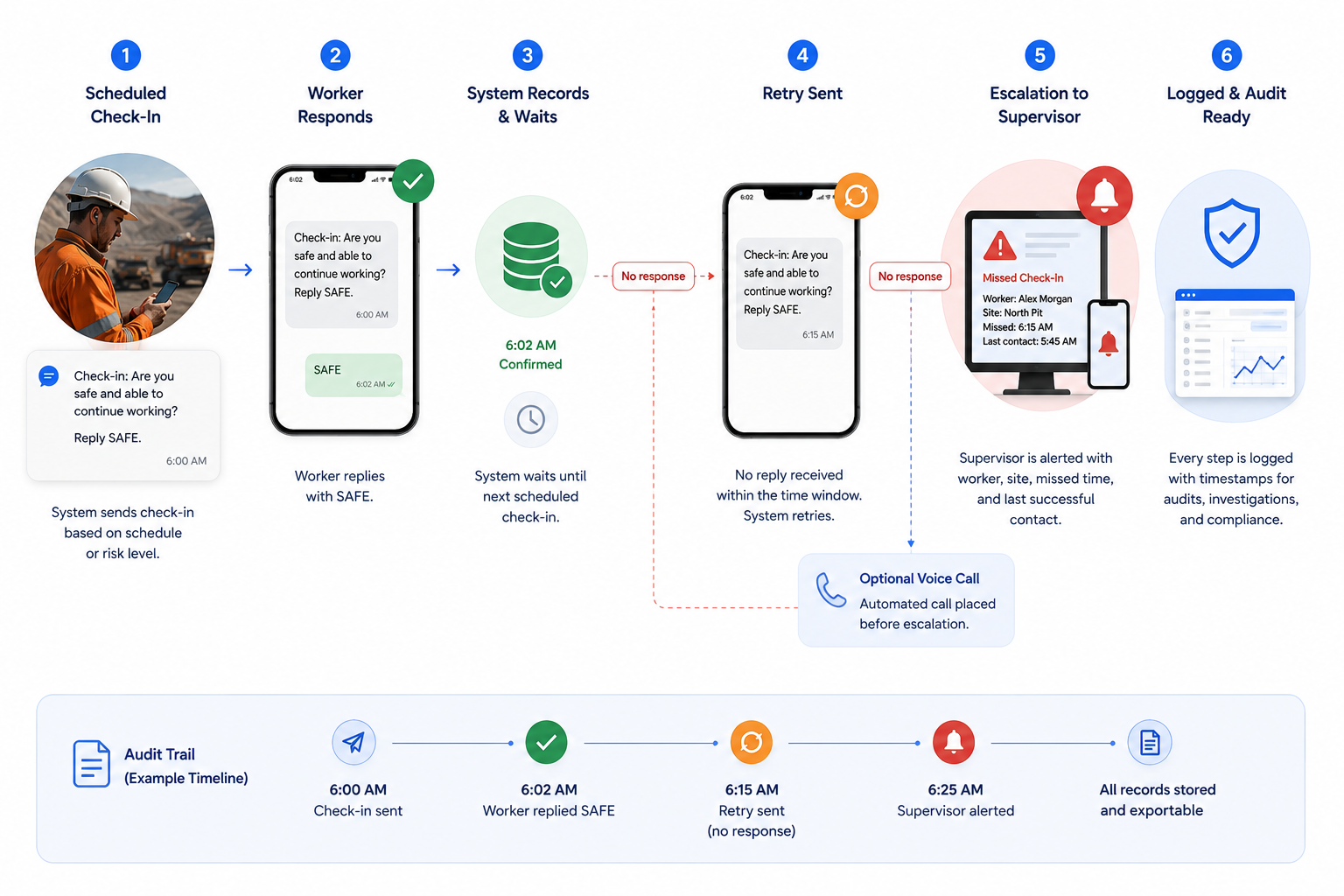 At the start of a shift, or on a schedule tied to the risk level of the task, the worker receives a message asking them to confirm they are safe. They reply with a single character or word. The system records the confirmation with a timestamp and goes quiet until the next scheduled check.
If no reply arrives within a defined window, the system does not wait for a human to notice. It retries. If the retry also gets no response, it escalates: a supervisor receives an alert identifying the worker, the site, the missed check time, and the last successful contact. Some operators add a voice call step between the retry and the escalation. Others tighten the window for high-risk tasks like confined space entry or solo driving on remote routes.
Every step in that sequence generates a record without anyone writing anything down. The check went out at 6:00 am. The worker confirmed at 6:02. Or the worker did not confirm, the retry went out at 6:15, and the supervisor was alerted at 6:25. That timeline is the evidence that the system of communication existed and operated, which is what an investigator asks for after an incident and what an auditor asks for before one.
This is the same principle that Australian transport and mining operators are applying to safety alerts more broadly, where the shift from email to acknowledgment-based SMS is already underway. A welfare check is simply the inbound version of the same logic: the worker's reply is the record. The pattern also connects to how operators handle unsolicited inbound reports from the field, which we cover in When the Field Needs to Reach You.
Why SMS carries the workflow
The channel choice matters more here than in almost any other workflow, because the population you most need to reach is the population least likely to be reachable on anything else.
SMS works on every phone the worker might carry, including the rugged feature phones common on mine sites and farms. It does not require data coverage, an installed app, an account, or a battery-hungry background process. In areas with marginal reception, an SMS will often get through when a data connection will not. For fleets, the same properties are why SMS remains the coordination channel for logistics operators across every geography they run in.
That said, the check-in workflow does not have to be single-channel. Workers with smartphones on covered routes can confirm via WhatsApp, and the escalation to supervisors can travel by voice call to make sure it is seen. The logic of the workflow stays constant while the channel adapts to the person, which is the same design principle behind early warning and dispatch systems that need to reach mixed populations reliably.
Getting started without a rollout project
The operational barrier to lone worker check-ins is usually imagined as a technology project. In practice, the minimum viable version needs three things: a list of workers with their numbers and sites, a schedule, and an escalation contact per site or crew. From there, the workflow can start with one crew on one site and expand as supervisors see the missed-check alerts doing their job.
The operators getting the most out of this pattern treat the check-in record as part of the same safety record system as their outbound alerts, so that a single retrieval covers both directions: what the company told the worker, and what the worker told the company. Under a framework where recordkeeping obligations run both ways, that completeness is the point.
Frequently asked questions
What counts as remote or isolated work under the WHS framework? Work that is isolated from the assistance of other people because of its location, its timing, or its nature. This includes obvious cases like solo work at remote sites, but also night shifts, solo driving, home visits, and after-hours work in otherwise busy facilities. If a worker could not quickly get help from another person, the duty to ensure effective communication applies.
Do lone worker check-ins require a smartphone app? No, and in most Australian field environments an app-based approach is the wrong starting point. SMS check-ins work on any phone without data coverage or installation. If parts of your workforce carry smartphones with reliable coverage, channels like WhatsApp can be added on top of the same workflow. Our guide to choosing the right messaging channel covers the tradeoffs.
Why is SMS better than email for lone worker check-ins? Three reasons. Reach: SMS arrives on any phone without data coverage, which matters most at the remote sites where checks matter most. Response: a check-in needs an answer within a defined window, and SMS makes replying a two-second action while email replies are slow, inconsistent, or never come. Record: an SMS reply is a timestamped confirmation tied to a specific worker and check, while an email system cannot reliably show whether a message was even seen. Email can stay in the workflow for non-urgent summaries, but it should not carry the check itself.
How often should welfare checks happen? Frequency should follow the risk assessment for the task, not a fixed rule. Common patterns are start and end of shift for lower-risk solo work, hourly or two-hourly checks for higher-risk remote tasks, and tighter windows for specific activities like confined space entry or long solo drives. The workflow should make frequency easy to vary per crew or task.
What happens if a worker does not respond to a check-in? The system should retry automatically, then escalate to a nominated supervisor with the worker's identity, site, and last successful contact time. The escalation path and timing belong in your safe work procedures, and every step should be timestamped so the response is verifiable afterward.
This article provides general operational information and should not be considered legal advice. Organizations should consult qualified legal or workplace safety professionals regarding their specific compliance obligations.
Build the check-in workflow before you need the record
If your risk register includes remote or isolated work and your communication system is a phone roster or a group chat, the gap is already visible. Talk to Telerivet about building a lone worker check-in workflow that fits your sites, your shifts, and your escalation chain.
