
A message that uses someone's name, mentions their location, or references their appointment feels different from a generic broadcast. In Telerivet, you can personalize any message with information already stored on your contact records, automatically, across every contact in your audience at once. This article explains how it works and what you can do with it.
What personalization looks like in practice
When you write a message in Telerivet, you can insert a contact field anywhere in the text. When the message sends, Telerivet replaces that field with the actual value stored for each contact. Every person in your audience receives a message with their own details filled in.
The campaign preview below shows this in action. The message includes the contact's name and their branch location. The WhatsApp preview on the right shows exactly how it renders for a real contact before sending.
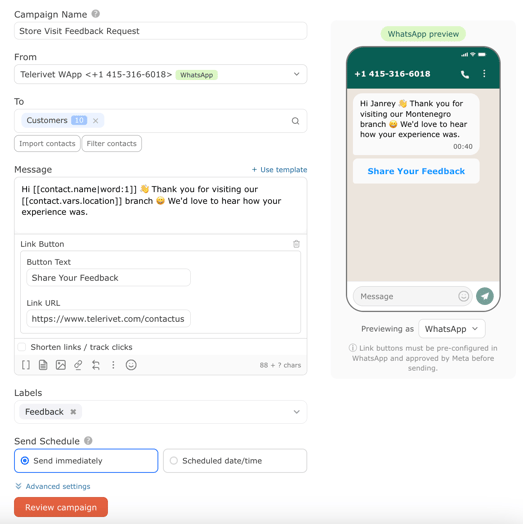 The composer shows the field references. The preview shows the result. Every contact in the group gets the same structure with their own details.
To insert a field, click the [] button in the message toolbar. A picker shows all available fields from your contact records. Select any field and it drops into your message at the cursor position. You can use fields in Send Message, any campaign type, automated services, and message templates.
What you can personalize
Any information stored on a contact record can go into a message. The more structured your contact data, the more specific your messages can be.
| Program type | What you can include | Example message |
|---|---|---|
| Retail and loyalty | Name, loyalty tier, points balance | "Your Gold tier reward is ready. You have 340 points to redeem." |
| Healthcare | Name, appointment date, clinic name | "Your appointment on July 3 at Westlands Clinic is confirmed." |
| Logistics and delivery | Name, order ID, delivery date | "Your order is out for delivery today, James. Track it here." |
| Fintech and lending | Name, amount due, due date | "Hi Maria, your payment of KES 4,500 is due on July 10." |
| Field programs | Name, zone, supervisor | "Your zone 3 report is due Friday. Contact James with questions." |
| Consumer brands | Name, favorite product, location | "A new shipment of your Latte blend just arrived at our Makati branch." |
The key is that the information needs to exist on the contact record before you send. A message that references a loyalty tier only works if that field is populated for the contacts in your audience. For how to set up and populate contact fields, see Managing Contact Fields in Telerivet and Importing Contacts into Telerivet.
Before you send: check for empty fields
The preview pane in the campaign builder shows how your message will render for a real contact before you send. Use it. If a contact is missing the value for a field you have used, that part of the message will be blank, which can produce awkward results at scale.
Two ways to handle this: add a fallback value to any field where an empty result would look broken, or use the Filter contacts option in the campaign builder to send only to contacts who have the relevant field populated. Both approaches take less than a minute and protect against the kind of message that goes out reading "Hi , your appointment at is confirmed."
For a deeper look at how to build and maintain clean contact data, see Understanding Contacts in Telerivet.
Frequently asked questions
Where can I use personalization in Telerivet? Anywhere you write a message: Send Message, Message Broadcasts, Relative Campaigns, Birthday / Anniversary Campaigns, Service Broadcasts, automated services, and message templates. If there is a message field, you can personalize it.
Do I need to know any code to use personalization? No. Click the [] button in the message composer, select a field from the picker, and it inserts automatically. You do not need to type any syntax manually. The preview pane shows the result for a real contact before you send.
What happens if a contact is missing a field value I used in my message? The field renders blank for that contact. To avoid this, either add a default fallback for the field or filter your audience before sending to include only contacts who have that field populated. The campaign builder's Filter contacts option makes this straightforward.
Can I personalize messages sent through automated services, not just campaigns? Yes. Variables work exactly the same way in service messages: auto-replies, poll questions, and any message a service sends during a flow. A service that captures a contact's name can use it in every message it sends afterward in the same conversation.
Best practice tip
Personalization works best when it connects directly to what you are asking the contact to do. A loyalty message that includes the contact's current points balance is more motivating than one that just uses their name. A post-visit survey that names the specific branch they visited gets more responses than a generic follow-up. Before adding a field to a message, ask: does this make the call to action feel more relevant to this specific person? If yes, include it. If it is there just to look personalized, it probably is not adding much.
For more on what makes personalization land across different channels and markets, see Simple Personalization Tactics That Make SMS Messages Feel More Human on the Telerivet blog.
Need help designing a personalization strategy for a large contact base or multi-channel campaign? Our Solution Engineers can help.