
If you have connected a route in Telerivet and are now looking at the Services menu, the next question is usually: which service type do I pick, and what can I actually build with it? Automated services are the part of Telerivet that turns message delivery into two-way communication and operational logic. A service runs whenever a trigger fires, applies whatever rules or conditions you define, and takes action automatically: sending a reply, updating a contact record, adding someone to a group, validating a code, or kicking off a campaign. Choosing the right service type for your goal is the first decision, and it is simpler than the list of options may make it appear..
Which service type fits your goal
The Services menu in Telerivet offers several types. The right one depends on what you are trying to accomplish, not on how much technical experience you have.
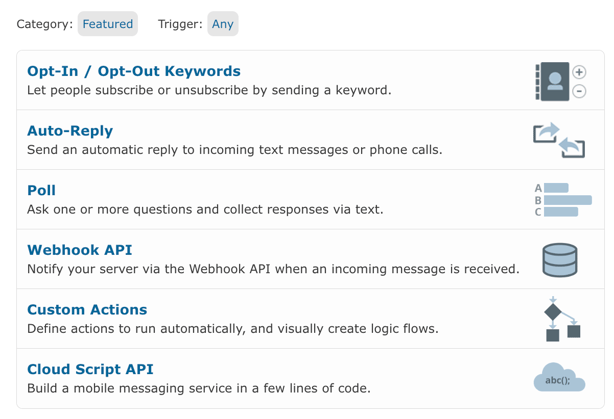
| If you want to... | Use this service type | What it does |
|---|---|---|
| Send an automatic reply when someone texts a keyword | Auto-Reply | Matches incoming messages to keywords and sends a defined response. No code needed. Good for FAQ handling, confirmation messages, and HELP menus. |
| Let contacts subscribe or unsubscribe by texting a keyword | Subscription (opt-in/opt-out) | Handles text-to-join and text-to-stop flows, including compliance responses for STOP messages. Manages group membership automatically. |
| Ask questions, collect responses, and trigger actions based on answers | Poll | Sends questions, branches on responses, and can add contacts to groups, set contact variables, send airtime, or call a webhook based on what the contact says. See Introduction to Surveys and Poll Services for detail. |
| Build a multi-step flow with conditions, logic, and actions | Custom Actions | A visual rules engine. Define conditions (message contains a word, contact is in a group, a variable has a value) and chain actions. Handles most real-world workflows without code. |
| Build complex logic that needs JavaScript | Cloud Script | Write JavaScript that runs on Telerivet's servers. Used for data table lookups, conditional branching beyond what Custom Actions supports, external API calls, and reward validation. |
| Route incoming events to your own server | Webhook | Sends an HTTP notification to your endpoint when a message is received. Used for integrations with your own systems. |
Most operators starting out use Auto-Reply, Subscription, or Poll for their first service. Custom Actions covers the majority of more complex workflows without requiring code. Cloud Script and Webhook are available when you need them.
How services fit into the rest of the platform
A service handles the logic layer. It does not send messages on its own schedule and it does not manage your contact list. Those are handled by other parts of the platform that work alongside services.
Routes carry messages in and out. A service runs when a message arrives on a connected route, so your route needs to be active before a service can respond to anything.
Contacts are who the service acts on. When a service runs, it can read and write contact fields, add or remove contacts from groups, and use contact data to make decisions. A poll service that asks a registration question and updates a contact variable is doing contact management as part of its logic. See Managing Contact Fields in Telerivet and Understanding Contacts in Telerivet: Lists, Filters, Groups, and Segmentation for how contact data is structured.
Campaigns are how you send outbound messages at scale or on a schedule. A campaign can invoke a service as one of its steps, meaning the automation you built in a service can run as part of a timed sequence. For more on how campaigns and services work together, see Understanding Messaging in Telerivet: Messages, Broadcasts, and Campaigns. For time-based triggers specifically, see How Message Scheduling Works in Telerivet.
For a broader view of how these components connect, the blog post Automated Services in Telerivet: What They Really Do covers the trigger-logic-action pattern across multiple industries. For a full breakdown of every service type and when to reach for each, see Understanding Automated Services in Telerivet: Service Types, Triggers, and When to Use Each.
Getting started
- Go to the Services page in your Telerivet project and click Add New Service.
- Choose a service type based on the table above. If you are unsure, start with Auto-Reply or Poll: both are well-suited to first builds and give you a clear result to test quickly.
- Define your trigger. For Auto-Reply and Subscription services, this is a keyword. For Poll services, you choose whether contacts initiate the flow or you send the first question outbound. For Custom Actions, you set conditions on the incoming message.
- Set your actions. What should happen when the trigger fires? At minimum, send a reply. Add contact management, data recording, or campaign triggers as your workflow requires.
- Test before activating. Use the Test Service button to simulate messages and confirm the service behaves as expected. The User Guide covers testing steps for each service type under Automated Services.
If your contacts are not yet in Telerivet, start with Importing Contacts Into Telerivet before building. For how to segment contacts into groups that services can act on, see Segmenting Your Audience for Better Results on the Telerivet blog.
For more on building a specific type of service, the User Guide section on Introduction to Services covers the setup flow for each type.
Frequently asked questions
What is the difference between a service and a campaign in Telerivet? A service runs in response to a trigger: an incoming message, a keyword, a scheduled time, or an event in the platform. It handles the logic of what should happen. A campaign handles outbound messaging at scale, sending to a contact group on a schedule or relative to a date. The two work together: a campaign step can invoke a service, and a service can trigger a campaign. If you are sending a blast to a list, that is a campaign. If you are responding to an incoming message or running a registration flow, that is a service.
Do I need to know how to code to build a service? No. Auto-Reply, Subscription, and Poll services require no code. Custom Actions uses a visual rules engine that handles conditions and actions without writing any JavaScript. Cloud Script is available for operators who want to write code for complex logic, but it is not required for the majority of workflows.
Can one service handle multiple keywords or conditions? Yes. A Custom Actions service can have multiple conditions that each match different keywords or message patterns, with different actions per branch. You can also run multiple services in a project simultaneously, with ordering rules to control which service processes a message first. See Ordering Multiple Active Services in the User Guide.
What happens if an incoming message does not match any of my service conditions? If no active service matches an incoming message, the message is received and stored in Telerivet but no automated action runs. You can set a catch-all Auto-Reply to handle unmatched messages: a service that responds to any message that does not match another keyword. This is useful for directing contacts to the right keyword or confirming receipt.
Best practice tip
Start with the narrowest version of the workflow you actually need, not the most complete version you can imagine. A service that answers one keyword reliably and updates one contact field is more useful in week one than a nine-condition Custom Actions service that is still being tested. Build the simple version, activate it, watch how contacts use it, and expand from there. Most services in production started as a two-step proof of concept.
For more on what organizations are building with automated services across industries, see Three simple journeys every organization should automate on the Telerivet blog.
Need help deciding which service type fits your workflow, or designing a multi-step automation? Talk to our Solution Engineers.