For many small teams, WhatsApp is the business. Customers already have your number saved, and you answer them from the WhatsApp Business app on your phone. But once you want to send a broadcast to all of your customers, reply automatically after hours, or let your whole team share the inbox, the app isn't enough.
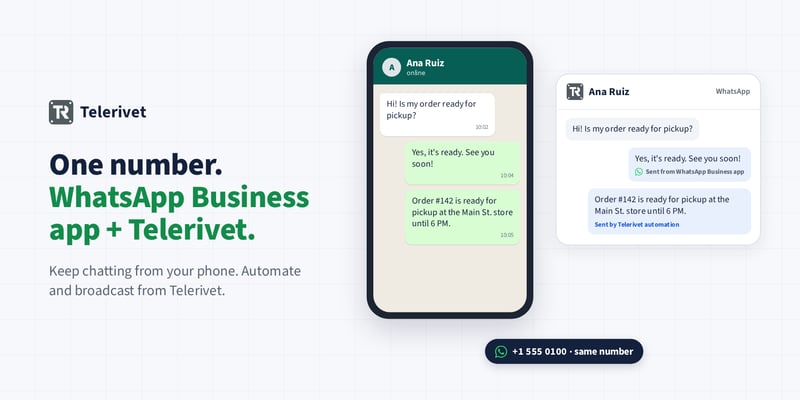
Until recently, moving to the WhatsApp API meant giving up the app on that number, or switching to a new number your customers wouldn't recognize. With WhatsApp coexistence, you don't have to choose. You can connect your WhatsApp Business app number to Telerivet and keep using the app at the same time.
How it works
- Keep chatting from your phone. Answer customers one-to-one in the WhatsApp Business app, just like before.
- Do more from Telerivet on the same number. Send broadcasts and campaigns, set up automated replies, polls and other services, use the AI Operator, and share conversations with your team.
- See the whole conversation in one place. Messages you send from the app automatically appear in the conversation in Telerivet, so everyone on your team sees the full history.
- Keep app messages free. Messages you send from the WhatsApp Business app remain free. Messages sent from Telerivet use WhatsApp's regular API pricing.
A tip for automated replies
When your number is connected, messages from your customers arrive in both the app and Telerivet. If you set up an automated reply in Telerivet, it will answer even if someone also replies from the app. To avoid double replies, it helps to limit automation to specific keywords, or to times when nobody is answering from the app, such as outside business hours.
Setting it up
In Telerivet, click Routes, then Add Route, then WhatsApp, and click Login with Facebook. When you're asked to choose a WhatsApp Business account, choose Connect a WhatsApp Business App and enter your app's phone number. Then follow the steps to confirm the connection in the WhatsApp Business app on your phone.
Good to know
- Your phone needs WhatsApp Business app version 2.24.17 or later.
- Messages sent before you connect the number aren't imported into Telerivet.
- Some WhatsApp Business app features change once your number is connected: broadcast lists are turned off (you can send broadcasts from Telerivet instead), and disappearing messages, view-once messages and live location are turned off in one-to-one chats. Group chats aren't synced with Telerivet.
- Messages sent from Telerivet follow WhatsApp's 24-hour customer service window. If a customer messaged you before you connected your number, reply from Telerivet with an approved template message, or reply from the app.
For full details from WhatsApp, see Meta's guide to connecting WhatsApp Business app numbers.
Getting started
WhatsApp coexistence is available now when you add a WhatsApp route. For step-by-step setup instructions, WhatsApp pricing and message templates, see WhatsApp Integration in the User Guide.
Questions about connecting your number? You can reach us at support@telerivet.com.