
You have added a route and you are ready to build. The next step is creating a service, but the services menu offers several types, and it is not always obvious which one fits your workflow. Telerivet's automated services are reusable pieces of logic that run whenever a trigger fires: an incoming message, a keyword, a scheduled time, or a system event. Each service type is designed for a different kind of workflow. This article breaks down the core service types, what triggers each one, and how to choose the right starting point for your use case.
For a general introduction to what services are and how they work, see Getting Started with Automated Services.
Core messaging service types
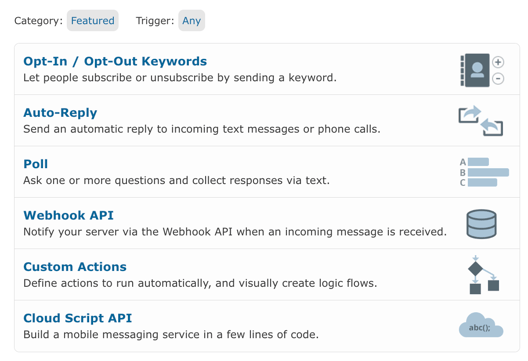 When you open the Add Automated Service menu, Telerivet shows a Featured view by default. The featured types are the building blocks that cover the vast majority of messaging workflows. Start here ➡️
| Service type | Triggered by | Best for |
|---|---|---|
| Auto-Reply | Any incoming message or matched keyword | Instant responses, FAQ replies, acknowledgment messages |
| Opt-In / Opt-Out Keywords | A contact texting a specific keyword | Subscription management, list building, consent handling |
| Poll | Inbound message or outbound campaign | Structured data collection, feedback, registration flows |
| Webhook API | An incoming message, forwarded to your server | Connecting Telerivet to an external system in real time |
| Custom Actions | Any inbound message, with visual logic flow | Multi-step conversations, conditional routing, branching responses |
| Cloud Script API | Any trigger, with custom JavaScript logic | Complex workflows, data table lookups, external API calls |
Auto-Reply
An Auto-Reply service fires whenever an incoming message matches a defined condition: a specific keyword, any message, or a message that does not match any other active service. It sends a response immediately, without manual intervention.
This is the most common starting point. It handles the majority of simple inbound workflows: confirming a registration, responding to a HELP request, sending a menu of options, or acknowledging that a message was received.
Use Auto-Reply when:
- You need to respond instantly to any inbound message
- The response does not depend on stored data or external logic
- You are handling a single keyword or a small set of fixed replies
Opt-In / Opt-Out Keywords
A keyword service subscribes or unsubscribes a contact from a group when they send a specific word. It handles the response automatically, so contacts receive confirmation immediately. This connects directly to your contact groups, keeping segments current without manual work.
This is the standard mechanism for text-to-join campaigns, STOP/UNSUBSCRIBE handling, and any workflow where contacts self-select into or out of a program.
Use Opt-In / Opt-Out Keywords when:
- You are running a text-to-join campaign ("Text JOIN to 12345")
- You need STOP handling that automatically removes contacts from future sends
- Contacts should self-select into an audience segment
For setup detail, see Building a Keyword Opt-In Service in Telerivet.
Poll
A Poll service collects structured responses across one or more questions. It sends each question in sequence, records the answer to a contact field or data table, and can branch based on the response or trigger actions per answer. Non-responders can receive automatic reminders.
This service type powers registration intake, satisfaction surveys, eligibility screening, needs assessments, and any workflow where you need to capture multiple data points in a structured way. It works across SMS, WhatsApp, Viber, and voice. Responses are stored to contact fields automatically, so poll data flows directly into your contact profiles and can drive downstream segmentation and campaigns. See Managing Contact Fields in Telerivet for how contact fields work.
For a deeper look at how poll services work, see Introduction to Surveys and Poll Services.
Use Poll when:
- You need to collect more than one piece of information from a contact
- Responses should be stored to a contact field or data table for later use
- You want automatic follow-up for contacts who do not respond
Webhook API
A Webhook API service forwards an incoming message to your own server in real time, allowing an external system to process it and respond. Telerivet acts as the messaging layer; your server handles the logic.
This is the right option when you already have a backend system that should own the decision-making: a CRM, a payment platform, a custom database. The service passes the inbound message out, your server processes it, and Telerivet delivers whatever response your server returns.
Use Webhook API when:
- An external system should handle the logic for incoming messages
- You need to connect Telerivet to a backend application in real time
- The response depends on data held outside Telerivet
Custom Actions
Custom Actions is Telerivet's visual logic builder. You define a sequence of actions and conditions using a drag-and-drop interface: the service can branch based on what a contact says, update contact fields, assign contacts to groups, trigger other services, and send different responses depending on the path taken.
This service type handles multi-step conversations, conditional routing, guided intake flows, and anything where the right response depends on what the contact sent. It covers a wide range of use cases without requiring any JavaScript.
Use Custom Actions when:
- The workflow has more than one step or the response depends on what the contact said
- You need to update contact data or assign contacts to groups as part of the flow
- The logic is more complex than a single auto-reply but you do not need to write code
Cloud Script API
A Cloud Script service runs custom JavaScript on Telerivet's servers as part of any triggered workflow. It can query data tables, call external APIs, apply conditional logic beyond what the visual builder supports, and write results back to contacts or records.
This is the right option when your workflow requires lookups, calculations, integrations, or logic that Custom Actions cannot handle. It is also the foundation for prize code validation, fraud threshold checks, airtime disbursement, and other data-driven automation patterns.
Use Cloud Script API when:
- Your workflow requires a lookup against a data table or external system
- You need logic that the visual Custom Actions builder cannot express
- The service needs to read or write data beyond standard contact fields
Voice service types
If you are building on a voice route, Telerivet offers a parallel set of service types for call-based workflows. These appear in the same Add Automated Service menu and follow the same trigger-and-action structure.
| Service type | What it does |
|---|---|
| Audio Auto-Reply | Plays a pre-recorded audio message when a call is received |
| Call Forwarding | Forwards incoming calls to another phone number |
| Voice Poll | Collects responses via the touch-tone keypad |
| Voicemail | Records a voicemail and sends an email notification |
| Custom Call Flow | Defines a branching call flow with custom actions |
For guidance on when to choose voice over messaging channels, see Which channel should you use?.
Solution templates
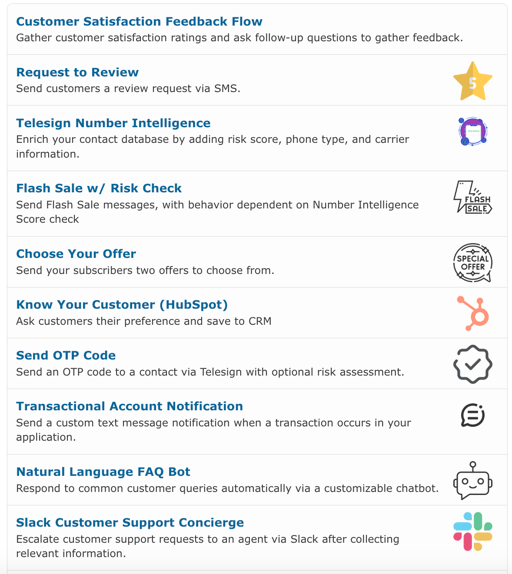 Telerivet also offers solution templates: pre-built workflows you can deploy in minutes without building from scratch. The image above shows a sample of what is available, but it is not a complete list. Templates exist for OTP delivery, CSAT flows, CRM enrichment, transactional notifications, chatbot FAQ handling, support escalation, and more, and new ones are added regularly. More importantly, any template can be modified or built from scratch to fit your specific workflow.
If you have a use case in mind that needs a template configured, contact us.
Frequently asked questions
What is the difference between a service and a campaign in Telerivet? A service runs in response to a trigger: an incoming message, a keyword, a scheduled event, or a system action. It handles the logic of what should happen. A campaign handles outbound messaging at scale, sending to a contact group on a schedule or relative to a date. The two work together: a campaign step can invoke a service, and a service can trigger a campaign. If you are sending a broadcast to a list, that is a campaign. If you are responding to an incoming message or running a registration flow, that is a service.
Can I run more than one service in the same project at the same time? Yes. You can have multiple services active simultaneously, each handling different keywords or triggers. When an incoming message arrives, Telerivet evaluates services in priority order and runs the first one that matches. A catch-all Auto-Reply should always sit at the bottom of the list, or it will intercept messages that a more specific service should handle. See Ordering Multiple Active Services in the User Guide for how to manage this.
Do I need to write code to build a service? No. Auto-Reply, Opt-In / Opt-Out Keywords, and Poll services require no code. Custom Actions uses a visual interface that handles conditions and branching without JavaScript. Cloud Script is available for operators who need code for complex logic, but it is not required for the majority of workflows.
Can a service update contact data as part of the flow? Yes. Most service types support contact management actions: adding or removing contacts from groups, setting contact variables, updating contact names, or blocking a contact from receiving messages. A poll service can update a contact's profile fields based on their answers. A Custom Actions service can set a variable mid-conversation and use it later in the same flow. This is what makes services the connective tissue between inbound messages and the contact data that drives campaigns.
Choosing your starting point
If you need to respond to inbound messages, start with Auto-Reply. If you need list management or consent handling, use Opt-In / Opt-Out Keywords. If you need to collect structured data, use Poll. If the flow has multiple steps or branches, use Custom Actions. If you need to connect to an external system, use Webhook API or Cloud Script API.
Most workflows start simple and grow. An Auto-Reply that works today can be extended with conditions using Custom Actions, or replaced with a Cloud Script as your logic evolves.
For configuration steps, see Introduction to Services and Creating Auto-Replies in the User Guide. For real-world examples of how these service types combine into working workflows, see Three simple journeys every organization should automate and Automated Services in Telerivet: What They Really Do on the Telerivet blog.
For time-based service triggers and scheduled sends, see How Message Scheduling Works in Telerivet. For how contact groups and filters work with service targeting, see Understanding Contacts in Telerivet: Lists, Filters, Groups, and Segmentation. For personalizing the messages your services send, see How to Personalize Messages in Telerivet.
Best practice tip
If you have more than one service active in a project, the order they are listed matters. Telerivet evaluates services from top to bottom and runs the first one that matches the incoming message. A catch-all Auto-Reply placed too high in the list will intercept messages that a more specific service should handle. Keep catch-all services at the bottom. See Ordering Multiple Active Services in the User Guide for more.
Not sure which service type fits your workflow, or building something that spans multiple types? Talk to our Solution Engineers.