Understanding Messaging in Telerivet: Messages, Broadcasts, and Campaigns
Messaging option explained: Send Message, all campaign types, Conversations, with guidance on when each is the right choice
Reaching your audience in Telerivet is not one-size-fits-all. Whether you are sending a one-time announcement, running a multi-step onboarding sequence, dispatching an interactive survey to a customer group, or responding to an individual, each situation calls for a different tool. This article explains every messaging option in Telerivet, what each one is designed for, and how they work together.
Which option fits your situation?
| If you want to... | Use this |
|---|---|
| Send a message to one or more contacts right now | Send Message |
| Schedule a one-time announcement to a group | Message Broadcast |
| Send a sequence of steps timed to each contact's individual date | Relative Campaign (Sequence) |
| Automatically send on a contact's birthday or annual date | Birthday / Anniversary Campaign |
| Dispatch an interactive flow to a group at a scheduled time | Service Broadcast |
| Send a voice call to a group | Call Broadcast |
| Read and respond to messages from a specific contact | Conversations |
| Respond automatically to incoming messages or run logic | Service |
Send Message: immediate, one-off outreach
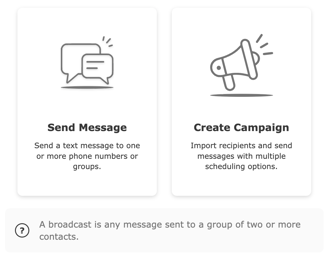
Send Message is the fastest path from intent to delivery. You type a message, pick recipients (an individual contact, a group, or phone numbers typed directly), and send immediately or schedule for later. It supports personalization through contact fields, media attachments, and short links, but there is no campaign structure, naming, or tracking attached to it.
Use Send Message when you have something to say right now and do not need the result to repeat, scale, or be analyzed later. Staff alerts, quick updates to a small group, and route tests are the most common uses. For personalizing messages with contact fields, see How to Personalize Messages in Telerivet. For tracking link clicks, see Understanding Short Links in Telerivet.
Campaigns: structured, tracked, and repeatable
A campaign adds structure to a send: a name, a defined audience, a schedule, and a record you can come back to. Every campaign in Telerivet generates a named record showing how many contacts received the message, how many replied, how many clicked a link, what failed and why, and in some channels, how many delivered and how many were read. That record is searchable and copyable. The next time you run a similar send, you start from what worked rather than from scratch.
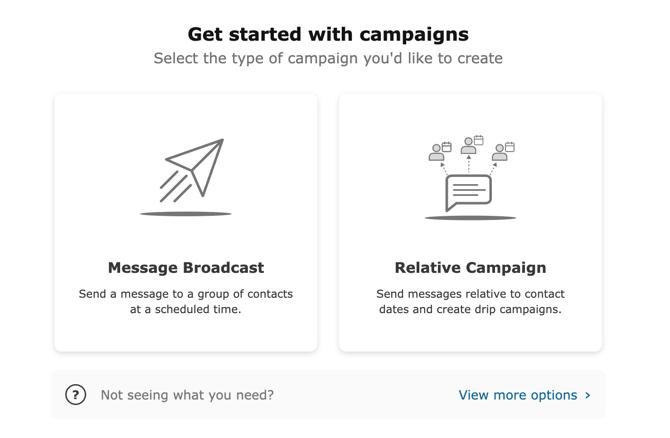
When you create a new campaign, Telerivet surfaces two primary options: Message Broadcast and Relative Campaign. A "View more options" link reveals the full set of five types.
Message Broadcast
A Message Broadcast sends a single message to a selected group immediately or at a scheduled date and time. The campaign builder includes a live channel preview pane showing how your message will render on a recipient's device, switchable between SMS, MMS, WhatsApp, Viber, and Messenger. If you select a channel without a connected route, the pane prompts you to set one up directly.
Under Advanced settings, optional reply actions let you add contacts to a group automatically when they respond or click a short link. A single broadcast can split your audience into engaged and not-engaged segments based on real behavior, without any separate automation step.
This is the right type for promotions, event notifications, seasonal announcements, and any one-time or recurring send where you want a named, trackable record you can copy and improve.
Relative Campaign (Sequence)
A Relative Campaign, also called a Sequence in the Telerivet onboarding flow, schedules a series of steps relative to a date stored on each contact's record. Each step fires at a defined interval before or after that date, and the campaign handles delivery automatically as contacts become eligible. Different contacts move through the sequence on their own timelines, each at the right moment for them.
Each step in the sequence is not limited to a message. When you add a step you choose between three types: Message (a text or media message sent directly), Service (any interactive flow you have already built in your account), or Call (a voice call with a selected audio source). A single sequence can mix all three. A practical example: one day before an appointment a message goes out, on the day a voice call fires, one day after a feedback survey starts automatically and collects a rating.
The Service step option is where sequences become a genuine program architecture. A feedback poll, a KYC intake form, or an NPS survey is built once as a service and can be included as a step in any campaign at any time. A clinic, a hotel, and a lender can all use the same post-interaction survey through completely different sequences with different audiences and timing, without anyone rebuilding the flow.
The date field the sequence references can be any date stored on a contact: a subscribe date, an appointment date, a loan due date, or any custom field you define. For how to set up date fields, see Managing Contact Fields in Telerivet. For the full scheduling mechanics, see How Message Scheduling Works in Telerivet.
Service Broadcast
A Service Broadcast dispatches an interactive flow to a group of contacts immediately or at a scheduled time. Where a Message Broadcast sends a message, a Service Broadcast starts a conversation: contacts receive the first message of the flow and the service handles their responses automatically from there.
This is the right campaign type when you want to reach a defined audience with something that requires their input rather than just their attention. A customer satisfaction survey sent to everyone who made a purchase this month. A product preference poll sent to a loyalty group before a new launch. A registration intake sent to event attendees the morning of the event. Each of these involves a back-and-forth that a message alone cannot handle.
Any active Contact Action service in your account can be used in a Service Broadcast. If you have built a poll, a KYC flow, or a feedback service, it appears in the service picker. Different teams can deploy the same flow to different audiences on different schedules without touching the underlying service.
For the types of interactive flows you can build and deploy through campaigns, see Getting Started with Automated Services, Understanding Automated Services in Telerivet, and Introduction to Surveys and Poll Services.
Birthday / Anniversary Campaign
A Birthday / Anniversary Campaign sends messages on the yearly recurrence of a stored date field. It follows the same logic as a Relative Campaign but anchors to the annual anniversary rather than the original date, so contacts receive messages every year automatically without the campaign needing to be recreated.
Like Relative Campaigns, each step can be a Message, a Service, or a Call, and you can build multiple steps around the anniversary date. Common uses include birthday greetings, membership anniversary messages, loyalty reward triggers, and annual renewal reminders.
Call Broadcast
A Call Broadcast sends a voice call to a group on the same scheduling model as a Message Broadcast: define a group, select an audio source, schedule a time. It includes the same optional reply actions as a Message Broadcast. See Getting Started with Voice and IVR in Telerivet for how voice routing works.
Conversations: when a human needs to be in the thread
The Conversations view in the Messages tab shows every exchange with a contact as a single threaded view, regardless of which channel it came through. SMS, WhatsApp, Viber, and other channels appear in the same thread alongside the contact's fields, groups, and message history.
This is the right interface when a specific person needs a response from a specific person on your team. A logistics coordinator following up with a field agent, a loan officer responding to a borrower's question, a support agent handling an escalation. Conversations and services are complementary: the service handles the automated layer, and a human steps in via Conversations when the situation requires judgment.
When you need a Service instead of a Campaign
Campaigns and Send Message handle outbound communication. The moment you need Telerivet to respond to an incoming message, run logic based on what a contact sends, or stay active continuously rather than at a defined send time, you are working with Services.
A service handles incoming messages, runs branching logic, updates contact fields, and can connect to data tables and external systems through Cloud Scripts. Keyword opt-ins, two-way conversation flows, automated polls, payment confirmation sequences, and any workflow that fires when a message arrives rather than when you schedule it: these are all services.
Services and campaigns are not separate worlds. A Service Broadcast deploys a service to a group at a scheduled time. A Relative Campaign or Birthday / Anniversary Campaign can include a Service step that fires an interactive flow at the right point in a sequence. Most complete programs in Telerivet combine both.
Getting Started with Automated Services covers how to build your first service. Understanding Automated Services in Telerivet explains every service type and when each applies. For a look at how services and campaigns work together across real programs, see Three Simple Journeys Every Organization Should Automate and Automated Services in Telerivet: What They Really Do on the Telerivet blog.
Frequently asked questions
What is the difference between Send Message and a Message Broadcast? Send Message is for immediate outreach with no record structure. A Message Broadcast is a named campaign with a defined audience, schedule, optional reply actions, and full delivery reporting. Use Send Message when you want to reach someone right now. Use a Message Broadcast when you want a structured, repeatable send you can track, copy, and analyze over time.
What is the difference between a Relative Campaign and a Birthday / Anniversary Campaign? A Relative Campaign fires steps at intervals before or after a specific stored date, such as three days after signup or one day before an appointment. It fires once when that date occurs. A Birthday / Anniversary Campaign fires on the yearly recurrence of a stored date, so contacts receive messages every year automatically without the campaign being recreated.
What is the difference between a Service Broadcast and a Service step inside a Relative Campaign? A Service Broadcast fires an interactive flow for a group at a specific scheduled time, as a standalone campaign. A Service step fires an interactive flow as part of a timed sequence anchored to each contact's date field. Use a Service Broadcast when you want to send a flow to a group at a set moment. Use a Service step when the flow is part of a longer automated journey.
When do I need a Service instead of a Campaign? When your workflow needs to respond to an incoming message, apply conditional logic based on what a contact sends, or stay active continuously rather than at a defined send time, you need a Service. Campaigns are outbound: they send to a defined group on a schedule. Services are event-driven: they run when something happens.
Can Telerivet send the same campaign across SMS and WhatsApp? Campaigns send from a single route per send. To reach the same group across two channels, create two campaigns each using a different route. For workflows where a message automatically falls back from one channel to another, Services are the right building block. See Getting Started with Routes in Telerivet for how routes connect to your project.
Best practice tip
The most underused capability in Telerivet is the combination of a campaign with a Service step or Service Broadcast. If you have built a poll or intake flow and only ever triggered it from an incoming keyword, you are using half of what it can do. Any interactive flow you have already built can be deployed to a defined audience at a scheduled time, through any campaign that includes a service step. For timing guidance before your first broadcast, Best Time to Send Messages covers how timing affects engagement across different markets and channels.
Need help designing a messaging workflow for your program? Our Solution Engineers can help. Get in touch.